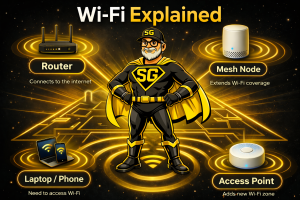
 Wi-Fi Explained: Routers, Adapters, Access Points, and Mesh (Plain English Guide)
If your Wi-Fi feels slow, unreliable, or confusing, you’re not alone. Most people use wireless internet every day without understanding what any of the equipment actually does. Then something buffers, drops, or refuses to connect and suddenly everyone becomes a reluctant IT specialist.
Let’s simplify this.
This guide explains what Wi-Fi really is, what the hardware actually does, and how to choose the right setup without drowning in tech jargon.
How Wi-Fi Actually Works (Simple Version)
Think of your internet like water coming into a house.
-
Your internet provider is the water company
-
The modem is the pipe into the building
-
The router or Wi-Fi system is the sprinkler system
-
Your devices are the plants trying to get watered
If the sprinklers don’t reach part of the yard, no amount of yelling fixes it.
Most Wi-Fi problems are coverage problems, not speed problems.
What Is a Wireless Adapter?
A wireless adapter is the part inside a computer or device that allows it to connect to Wi-Fi.
Examples:
-
Laptop internal Wi-Fi card
-
USB Wi-Fi adapter
-
Desktop Wi-Fi expansion card
It’s simply the radio that talks to your network.
Upgrading an adapter helps weak devices connect better, but it does not fix bad Wi-Fi coverage.
What Is a Router?
A router connects your home or office to the internet and manages all your devices.
It creates your Wi-Fi name, password, and handles traffic flow and security.
Most rental routers are underpowered and poorly placed, which causes weak signal and slow performance.
What Is a Wireless Access Point?
An access point is an additional Wi-Fi transmitter connected by cable.
It expands coverage into areas your main router can’t reach.
Access points are common in businesses and large buildings where wiring already exists.
What Is Mesh Wi-Fi?
Mesh systems use multiple small units that work together to blanket your space with Wi-Fi.
Instead of one device doing all the work, the load is shared.
Mesh is ideal for larger homes, multi-story buildings, and anyone tired of dead zones.
Mesh improves coverage. It does not increase the internet speed from your provider.
What About Wi-Fi Extenders?
Extenders repeat an existing signal. They are cheap and easy but often unreliable for anything beyond light use.
Quick Decision Guide
-
Weak Wi-Fi in parts of the building → Mesh
-
Desktop has no Wi-Fi → Wireless adapter
-
Large wired building → Access points
-
One small dead spot → Extender (last resort)
-
Everything slow everywhere → Router or ISP issue
🔥 STOP GUESSING — GET YOUR WI-FI DIALED IN
Free Wi-Fi Health Check from SpeakGeek PCs
If your Wi-Fi drops, buffers, disconnects, or just feels unreliable, guessing and buying random hardware wastes time and money.
A proper setup starts with understanding your space, your devices, and your real usage.
With our Free Wi-Fi Health Check, we’ll:
✅ Identify coverage gaps and dead zones
✅ Test real-world signal strength and interference
✅ Evaluate your router, adapters, and security
✅ Recommend the right solution (not the most expensive one)
✅ Explain everything in plain English
No pressure. No upsell games. Just clarity.
👉 Schedule Your Free Wi-Fi Health Check Today
📞 Call or Text: 702-472-8229
🌐 Visit: https://speakgeekpcs.com
Local service. Real humans. Real protection.
Common Mistakes People Make
-
Hiding routers in cabinets or closets
-
Using outdated rental hardware
-
Adding multiple extenders instead of fixing coverage properly
-
Overloading cheap routers with too many devices
-
Expecting Wi-Fi to penetrate thick walls and metal
Wi-Fi Security Still Matters
Weak Wi-Fi security exposes your personal data and business information.
Minimum standards include:
-
Strong passwords
-
Modern encryption
-
Firmware updates
-
Guest networks for visitors
Security should never be optional.
Final Thought
Reliable Wi-Fi isn’t magic. It’s planning, placement, and proper equipment.
If yours isn’t delivering, we’ll fix it.